

Description
Queryra is an AI search plugin for WooCommerce and WordPress — a semantic search
engine that understands what customers mean, not just what they type.
Your customer types “present for my girlfriend”. Your WooCommerce store returns:
0 results.
You sell gift boxes, perfumes, skincare sets — exactly what she’d love. But default
WooCommerce search can’t connect “present for girlfriend” to “Gift Box”.
Your customer leaves. Sale lost. This happens every day.
👉 Try AI Search live WooCommerce demo store —
200+ products across 10 brands. Search naturally and see the difference.
What is AI Search for WooCommerce?
AI Search replaces WooCommerce’s default product search with semantic search that
understands meaning. Your products stay the same. Your store stays the same.
Search just works.
Default WooCommerce search 0 results:
❌ “my skin looks tired”
❌ “gift for mom who loves candles”
❌ “looking older than my age”
Same store with AI Search products found:
✅ “my skin looks tired” Night creams, recovery oils, eye patches
✅ “gift for mom who loves candles” Scented candles, home fragrance sets
✅ “looking older than my age” Anti-aging serums, firming creams
Beyond Semantic Search
AI Search goes further than vector search alone. A natural language query like
“wireless headphones under $80, not Beats” applies the price filter AND excludes
the brand automatically. No other WooCommerce AI search plugin does this.
AI Search Setup in 5 Minutes
✅ Free trial — no credit card required
✅ No OpenAI account needed
✅ WooCommerce AI search ready in 5 minutes
Start your free trial |
See pricing
- Install and activate
- Follow the Setup Wizard
- Get your free API key at queryra.com/signup
- One-click WooCommerce product import
- Done — AI search now understands your customers
No coding. No configuration headaches.
WooCommerce AI Search Setup Guide
WooCommerce Product Search Features
- Natural Language Search – Customers type like they think, AI search finds
what they need - WooCommerce Product Search – Indexes titles, descriptions, SKUs, categories,
tags, and attributes - Semantic Search Ranking – AI ranks results by meaning, not alphabetical order
- Boost Controls – Promote products you want to sell more of
- Live Product Search – Instant AJAX-powered suggestions as customers type
- Auto-Sync – New WooCommerce products indexed automatically on publish
- Smart Context Detection – AI search activates on WooCommerce shop pages
automatically - Search Analytics – See what customers search for, including zero-result
queries
WooCommerce Product Search Works With Any Store
- Beauty & Skincare – “my skin looks tired” finds night creams
- Fashion – “something for a summer wedding” finds dresses
- Electronics – “good laptop for video editing” finds the right specs
- Home & Garden – “cozy living room” finds rugs, lamps, pillows
- Food & Beverage – “healthy snacks for kids” finds the right products
Semantic Search for WordPress Content
Queryra’s semantic search also works with regular WordPress content — posts, pages,
and custom post types. Perfect for knowledge bases, blogs, and FAQ sections.
Why Replace Default WooCommerce Search?
Default WooCommerce product search matches exact words. If your product is “Velora
Overnight Recovery Oil” and someone types “my skin looks tired”, they get nothing.
AI search fixes that — customers find products even with vague or natural language
queries.
Why Queryra vs Other WooCommerce Product Search Plugins?
No OpenAI Key Required — Other AI search plugins make you create an OpenAI
account and manage API keys. Queryra AI search includes everything.
Trained on YOUR WooCommerce Store — Not a generic AI. Semantic search learns
YOUR products, YOUR descriptions, YOUR categories.
Intent-Aware AI Search — Most semantic search plugins only match meaning.
Queryra goes further: “wireless headphones under $80, not Beats” applies the price
filter AND excludes the brand. Vector-only plugins ignore both.
Why vector search isn’t enough
Additional Information
Support
- AI Search Documentation
- FAQ
- WooCommerce Product Search Setup
- Email: support@queryra.com
Links
Screenshots
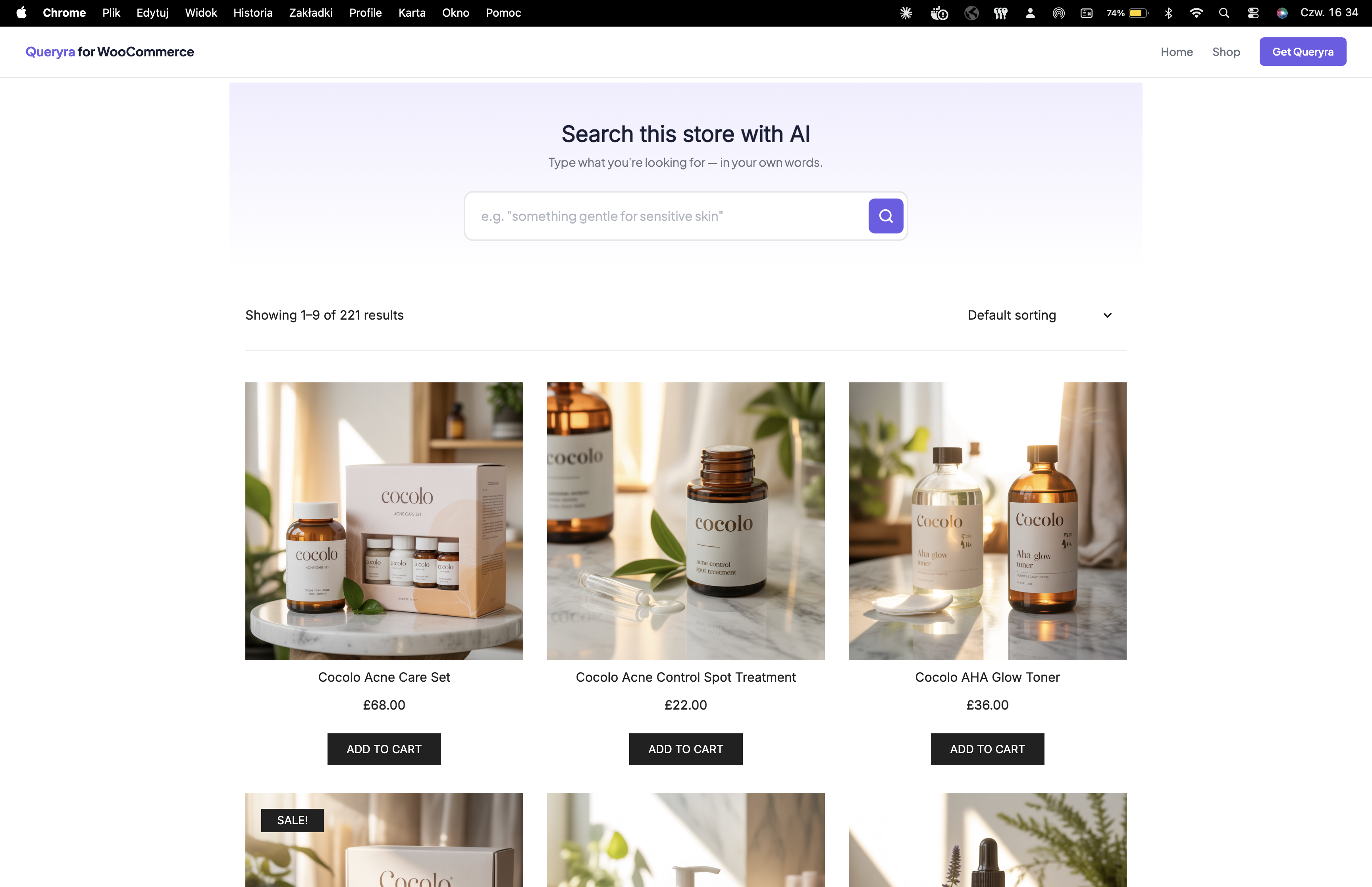
AI search live demo — type “present for my girlfriend” and find gift boxes, skincare sets, perfumes across 200+ WooCommerce products 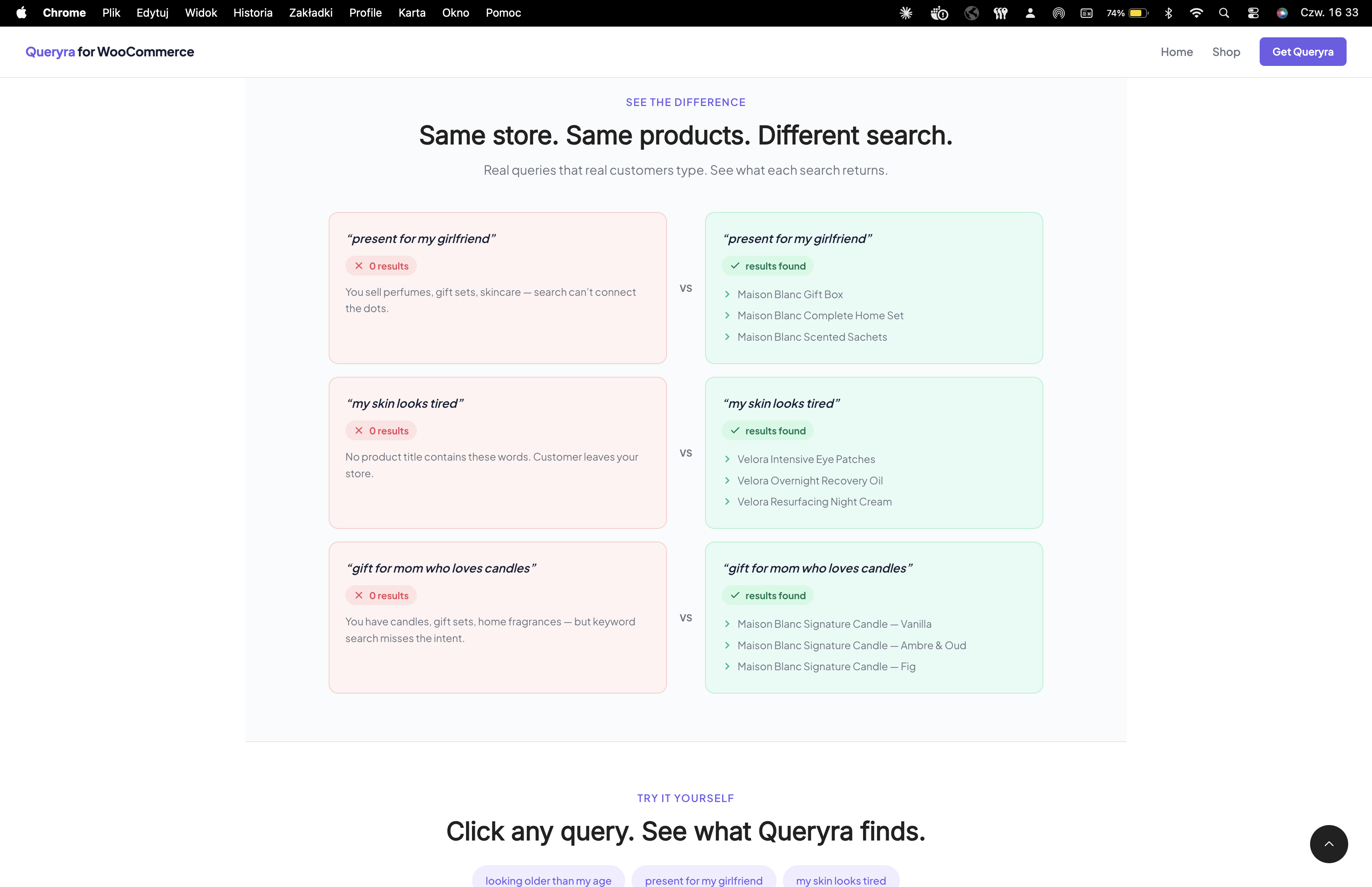
Default WooCommerce search vs AI search — same query, 0 results vs relevant products found with semantic search 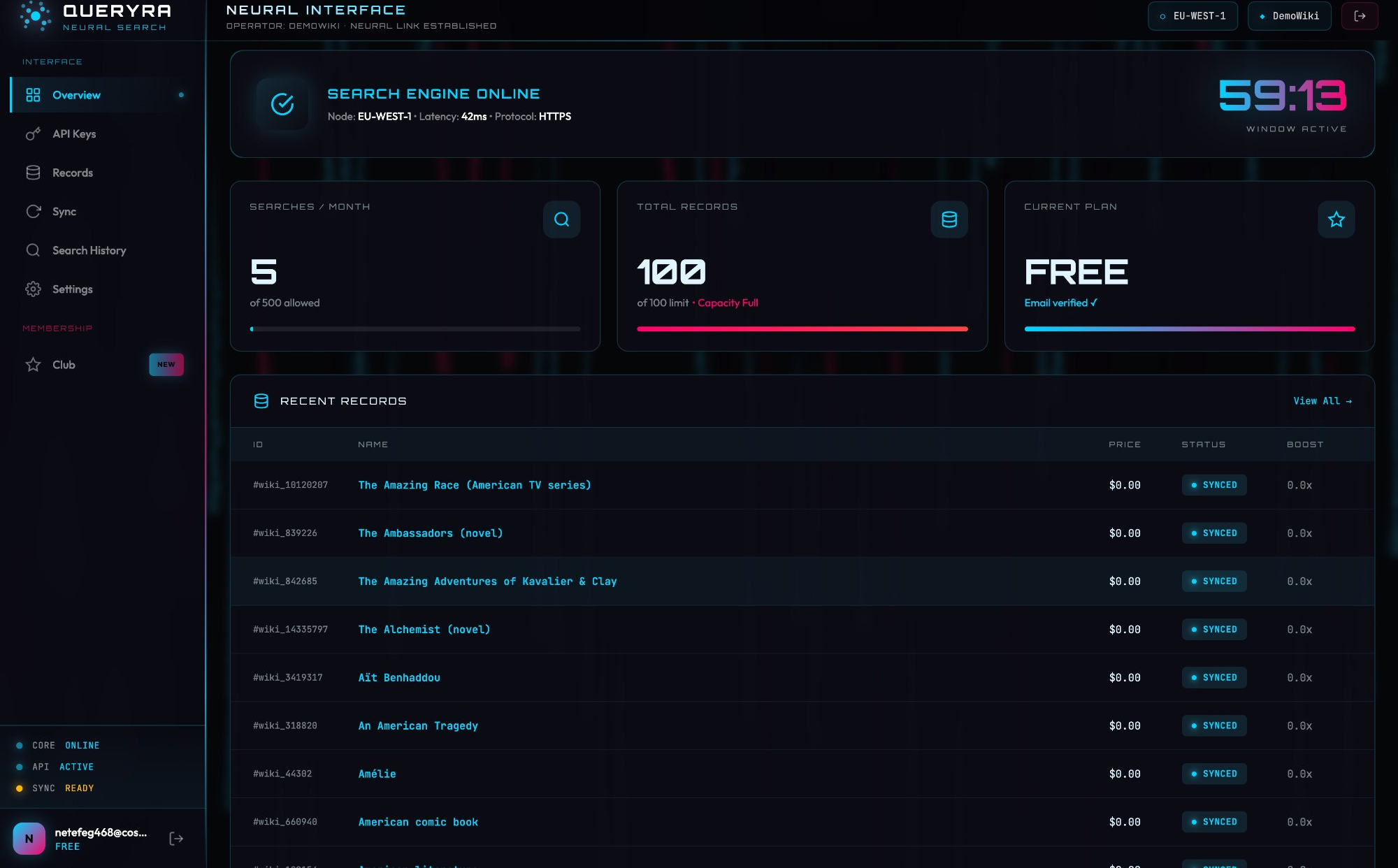
WooCommerce AI search results — natural language queries return meaningful, ranked products 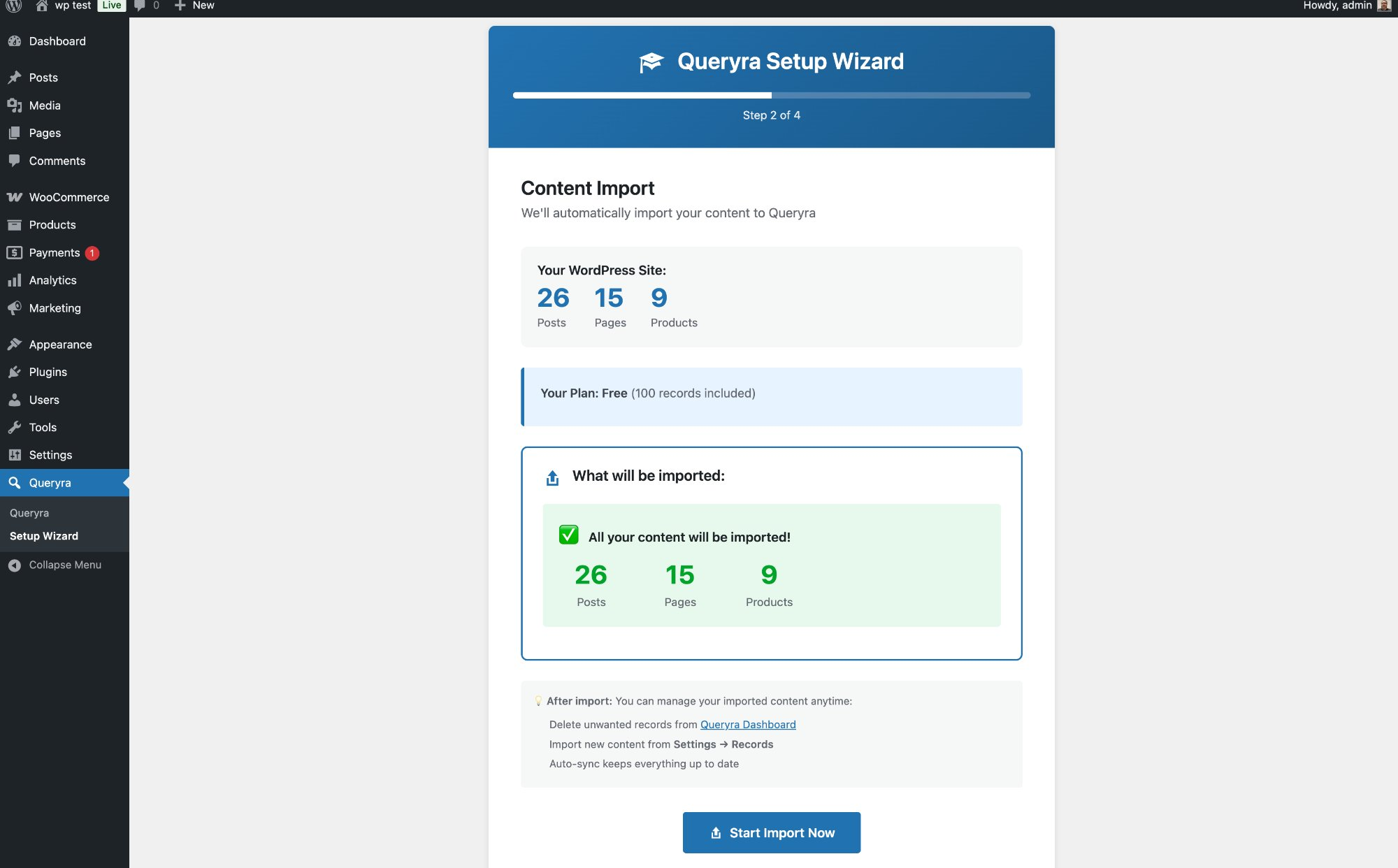
AI search Setup Wizard — guided WooCommerce setup with one-click product import 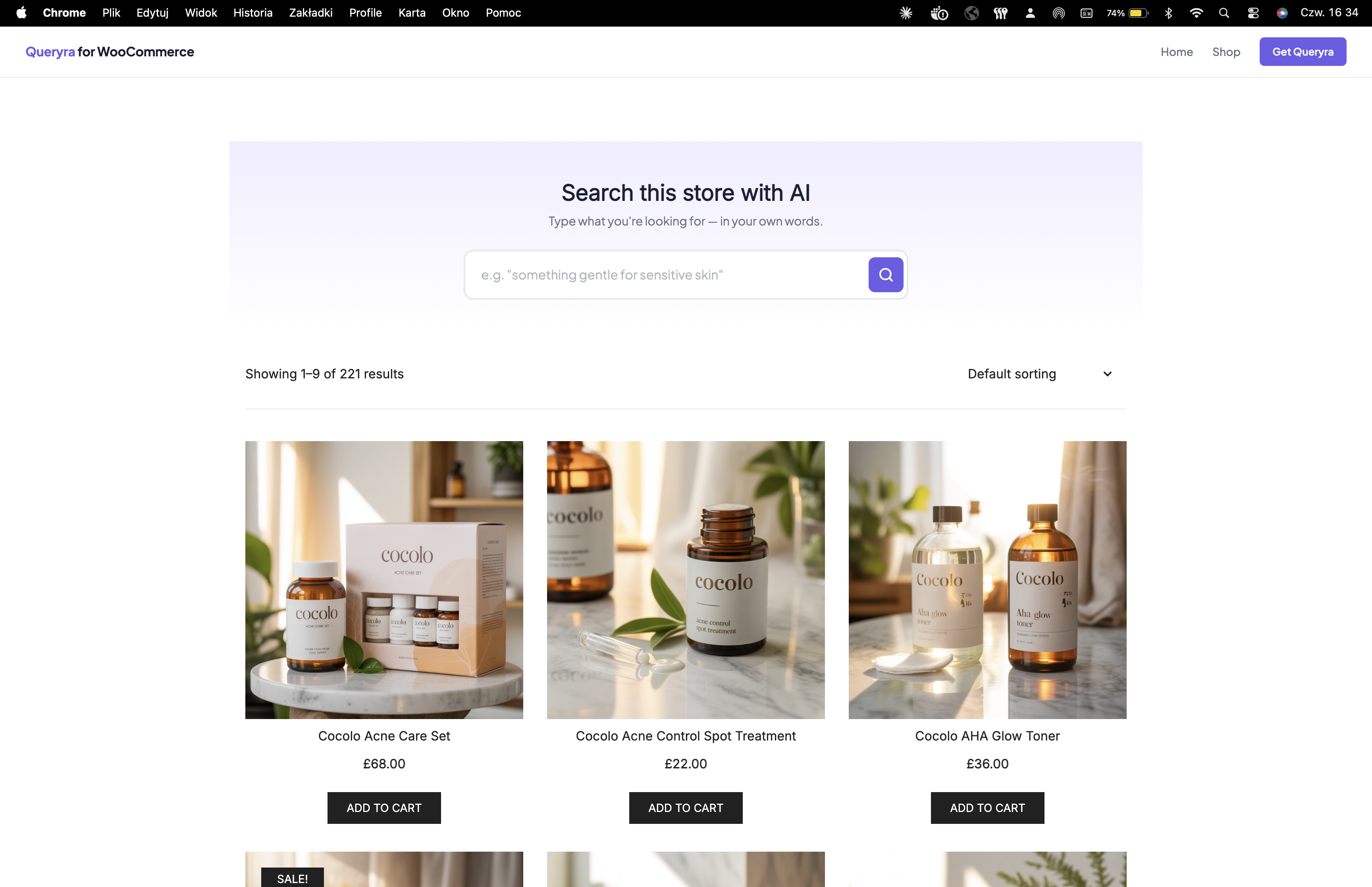
AI search dashboard — real-time semantic search statistics and query analytics 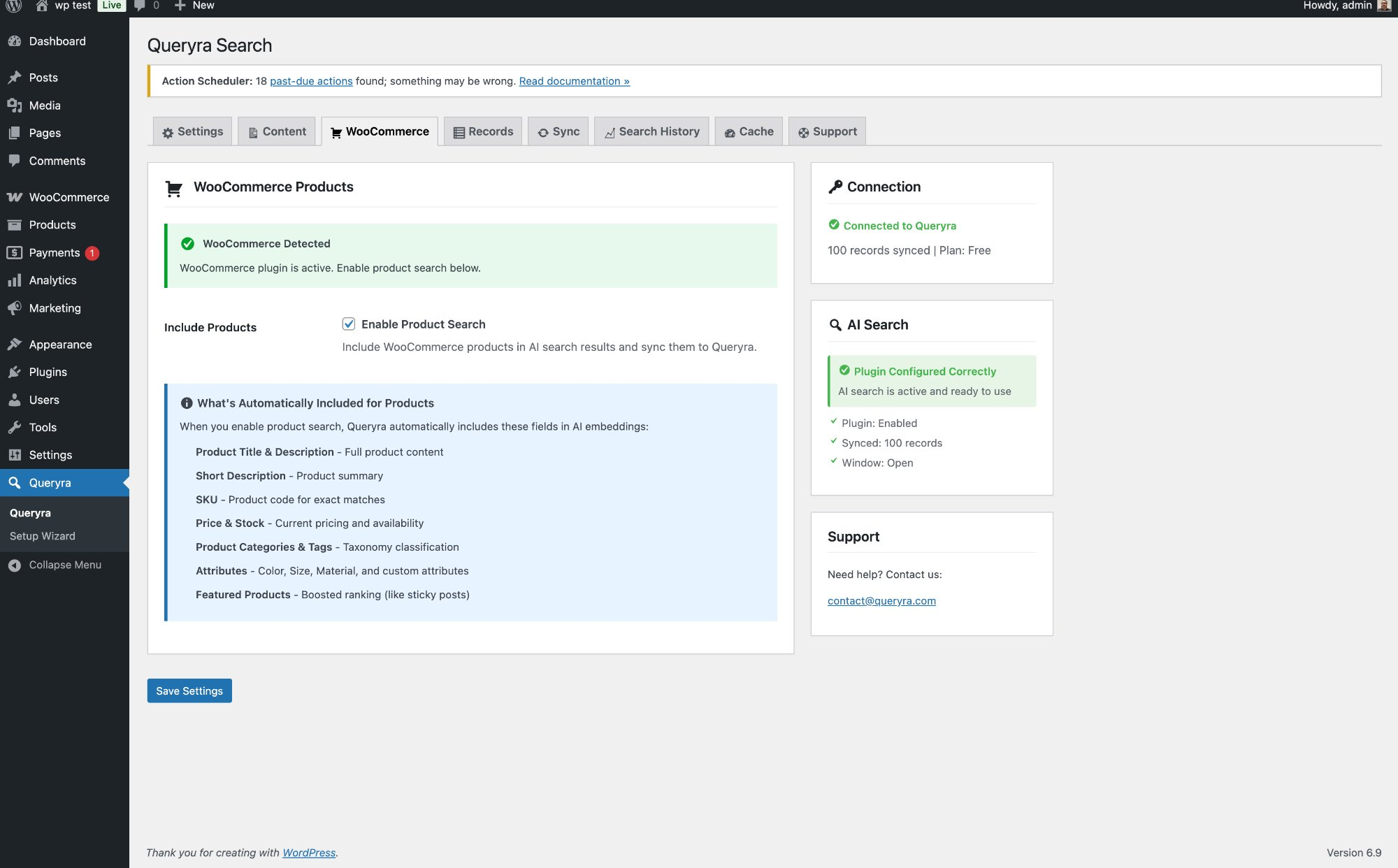
AI search settings — simple configuration, one API key, no OpenAI account needed
Installation
How to Install AI Search for WooCommerce
- Install: Plugins Add New Search “AI Search Queryra” Install Activate
- Setup Wizard: Follow the guided AI search wizard that appears automatically
- Get API Key: Create free account at queryra.com/signup
- Import Products: One-click import syncs all WooCommerce products into AI search index
- Enable: Turn on AI search and semantic search is ready
WooCommerce AI Search Setup Guide
WooCommerce Compatibility
- WooCommerce products, variations, and virtual products
- WooCommerce product SKUs, categories, tags, and custom attributes
- Regular WordPress posts, pages, and custom post types
- Any WordPress theme — AI search works without template changes
Minimum Requirements
- WordPress 5.8 or higher
- WooCommerce 5.0 or higher recommended
- PHP 7.4 or higher
- Free API key at queryra.com — no OpenAI account required
FAQ
-
What is AI Search for WooCommerce?
-
AI Search is a semantic search plugin that replaces the default WooCommerce product search with AI-powered search. Instead of matching exact keywords, AI Search understands what customers mean — so “gift for mom who loves candles” finds candles, not zero results.
-
How is this different from default WooCommerce search?
-
Default WooCommerce search matches exact words only. AI Search uses semantic search to understand customer intent. A query like “my skin looks tired” returns night creams and recovery oils — products that match the meaning, not the words.
-
Does AI Search work with WooCommerce products?
-
Yes. AI Search indexes WooCommerce product titles, descriptions, SKUs, categories, tags, and attributes. It supports product variations, virtual products, and any WooCommerce-compatible theme.
-
Can AI Search handle natural language queries?
-
Yes. Customers can search using natural language — “something warm for winter”, “gift for dad who likes coffee”, “wireless headphones not Beats under $80”. AI Search extracts intent, price filters, and brand exclusions automatically.
-
What is semantic search and how does it work?
-
Semantic search understands the meaning behind a query, not just keywords. AI Search converts your products into AI embeddings and matches them against the customer’s query using vector similarity — this is how it finds relevant products even when no keywords match.
-
Is an OpenAI account or API key required?
-
No. AI Search is powered by Queryra’s backend — no OpenAI account, no API key management, no per-request costs. One free API key at queryra.com covers everything.
-
Does AI Search support multiple languages?
-
Yes. AI Search supports 50+ languages out of the box including Polish, German, French, Spanish, Dutch, Japanese, Czech, and more. No configuration needed — customers search in their native language and find products automatically.
-
Will AI Search slow down my WooCommerce store?
-
No. AI Search processes queries via an optimized API. Products are indexed in the background. Search results are delivered in milliseconds — faster than most keyword search plugins.
-
How do I set up WooCommerce product search?
-
Install and activate the plugin, follow the Setup Wizard, get a free API key at queryra.com/signup, and run a one-click product import. AI Search is ready in under 5 minutes. No coding required.
-
What happens when AI Search finds no results?
-
AI Search falls back automatically to WordPress default search so customers always see something. You can also use Search Analytics to identify zero-result queries and fix gaps in your product catalog.
-
Does it support WooCommerce product variations?
-
Yes. Product variations are fully indexed including variation-specific SKUs, prices, and attributes. AI Search handles simple products, variable products, and virtual products.
-
Can I control which products appear first in search results?
-
Yes. AI Search includes Boost Controls — you can promote specific products or categories to appear higher in results. Useful for high-margin products or seasonal inventory.
Reviews

Contributors & Developers
“AI Search for WooCommerce – Semantic Search” is open source software. The following people have contributed to this plugin.
Contributors

Translate “AI Search for WooCommerce – Semantic Search” into your language.
Interested in development?
Browse the code, check out the SVN repository, or subscribe to the development log by RSS.
Changelog
1.1.10 (2026-04-09)
- Fixed: Null safety check for WooCommerce product sync operations (PHP 8.0+ compatibility)
- Fixed: Added nonce verification to admin notice dismissal for improved security
- Improved: Semantic search index stability during product deletion edge cases
- Improved: WooCommerce product search reliability for high-traffic stores
1.1.9 (2026-04-09)
- Improved: AI search ranking optimized for WooCommerce product search relevance
- Improved: Semantic search accuracy for natural language queries and intent detection
- Updated: LLM query parser now handles multilingual semantic search queries with better accuracy
- Updated: AI search index synchronization performance for large WooCommerce catalogs
- Updated: Documentation and FAQ for WooCommerce AI search setup
1.1.8 (2026-03-30)
- Updated: AI search now supports 50+ languages out of the box — multilingual semantic search with no configuration needed
- Updated: WooCommerce product search documentation updated to reflect multilingual AI search support
1.1.7 (2026-03-19)
- Updated: AI search plugin title optimized for WooCommerce product search discoverability
- Added: Intent-aware semantic search example — natural language price filter and brand exclusion
- Improved: AI search pricing documentation centralized to queryra.com/pricing
1.1.6 (2026-03-15)
- Improved: AI search settings simplified — API URL hardcoded for easier WooCommerce setup
- Added: Instance ID display in AI search Support tab for faster troubleshooting
- Improved: Semantic search status endpoint now sends instance ID and plugin type for better tracking
- Improved: Partner referral tracking for AI search API keys via site URL
1.1.5 (2026-03-03)
- Added: Batched bulk import with progress bar — AI search now supports WooCommerce stores with 50,000+ products
- Added: Plan limit check before AI search product import starts
- Improved: Semantic search index reliability with automatic retry on failed imports
- Improved: Setup Wizard product import now uses batched AI search sync
1.1.4 (2026-02-25)
- Added: Configurable AI search cache duration — from 1 minute to permanent caching
- Added: Record type metadata for WooCommerce products, posts, and pages in semantic search index
- Added: Content type filtering in AI search results
- Improved: Search Analytics dashboard with top queries and zero-result query tracking
- Improved: AI search cache settings UI in WooCommerce admin panel
1.1.3 (2026-02-12)
- Added: Live WooCommerce AI search demo store at woo.queryra.com — 200+ products, try natural language search
- Improved: Semantic search plugin description updated with real WooCommerce product search examples
- Improved: FAQ updated with AI search demo store links and use cases
- Improved: WooCommerce search integration simplified for better theme compatibility
1.1.2 (2026-02-02)
- Added: Anonymous AI search usage analytics to improve semantic search accuracy over time
- Added: Opt-out option for analytics via QUERYRA_DISABLE_ANALYTICS constant
- Privacy: No personal data collected — see queryra.com/privacy
1.1.1 (2026-02-01)
- Added: Full WooCommerce product search support powered by AI semantic search
- Added: WooCommerce product SKU, price, and attribute indexing for AI search
- Added: Smart product boost controls — promote high-margin products in AI search results
- Improved: Setup Wizard with one-click WooCommerce product import into AI search index
- Improved: Semantic search relevance algorithm for better natural language query results
1.0.7 (2026-01-29)
- Added: AI search plugin icon, banner, and WooCommerce screenshots
- Fixed: Asset file paths for WordPress.org compliance
- Improved: FAQ section with direct links to AI search documentation
1.0.6 (2026-01-29)
- Fixed: AI search documentation links updated
- Added: Privacy Policy and Terms of Service links for WooCommerce AI search compliance
1.0.5 (2026-01-28)
- Fixed: AI search dashboard stats display issue
- Improved: Semantic search PHP 8+ compatibility
1.0.0 (2026-01-23)
- Initial release: AI-powered semantic search for WordPress and WooCommerce
- Semantic search engine understands natural language product queries
- Auto-sync on publish — new WooCommerce products indexed automatically
- Free trial included — no OpenAI account required